The Backbone of my LOD System
Hello there!
It’s been a while since my first post — but for good reason. I’ve been deep in the trenches optimizing the Level of Detail (LOD) system for my game to squeeze every bit of performance I can.
Let’s start with the root problem: In large-scale scenes, the CPU takes a serious hit trying to update hundreds of characters every frame. When each character has AI, combat logic, pathfinding, and physics, things scale out of control fast. To solve this, I built a custom LOD system from the ground up that dynamically manages character update frequency and visibility — keeping performance rock solid even under intense loads.
Here’s what I’ve been working on:
Adaptive Update Budgeting: Each frame has a CPU budget for how many characters can update. Characters closer to the player or currently active in combat get prioritized, while distant or idle ones throttle their updates or disable entirely.
Freshness-Based Priority: Characters that haven’t been updated in a while are bumped in priority, ensuring fairness so no one gets “stuck” offscreen.
LOD Switching with Hysteresis & Cooldowns: To prevent jarring pop-ins and reduce CPU spikes, I implemented a cooldown timer and hysteresis margin on LOD transitions. Characters only switch LOD levels if they stay in/out of range for a few frames.
Far Mode Optimization: Characters in the farthest tier (Far LOD) are completely disabled when not in use. Animations and logic are culled until they re-enter a relevant range or are needed again. This drastically reduces overhead.
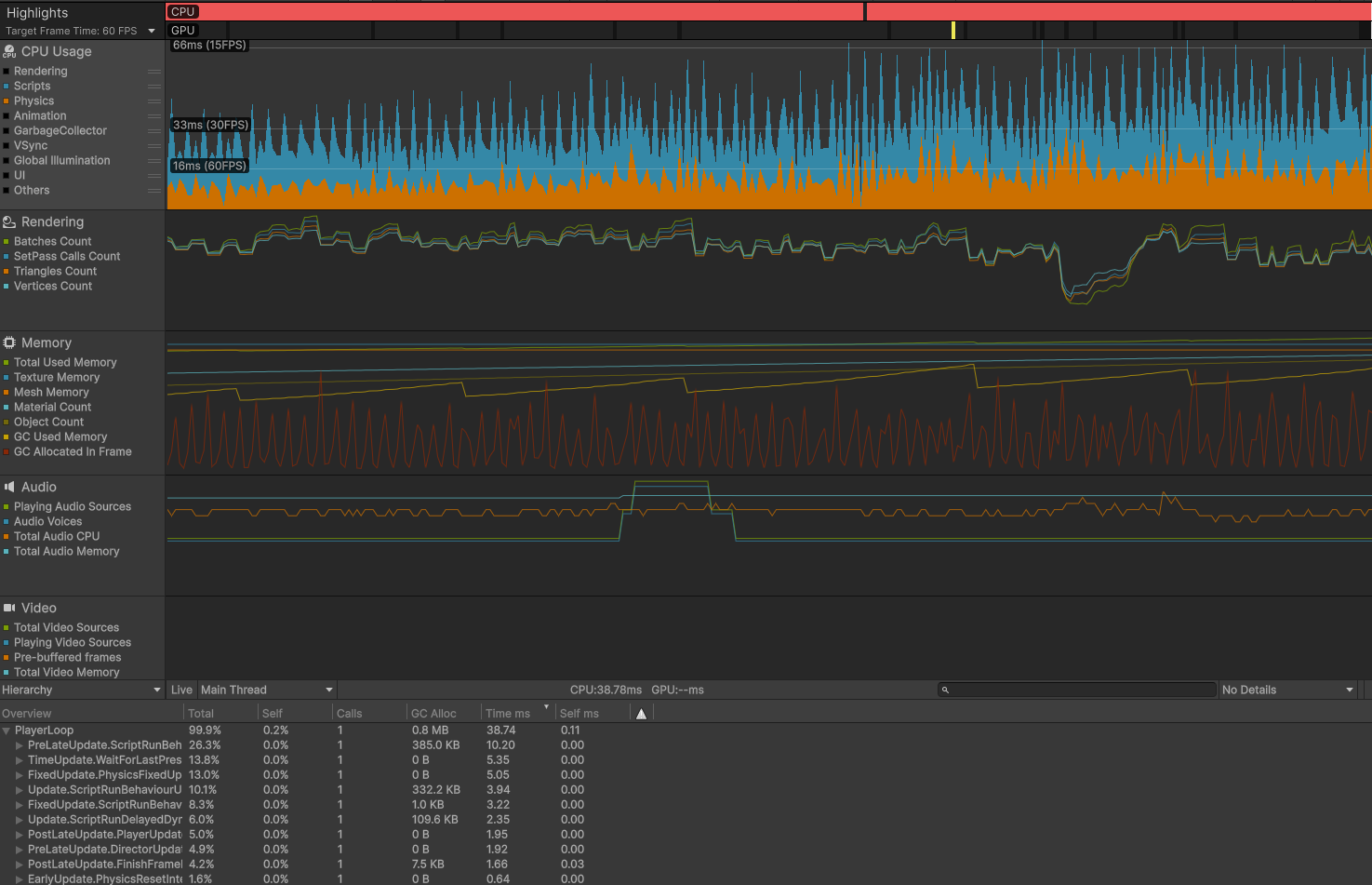
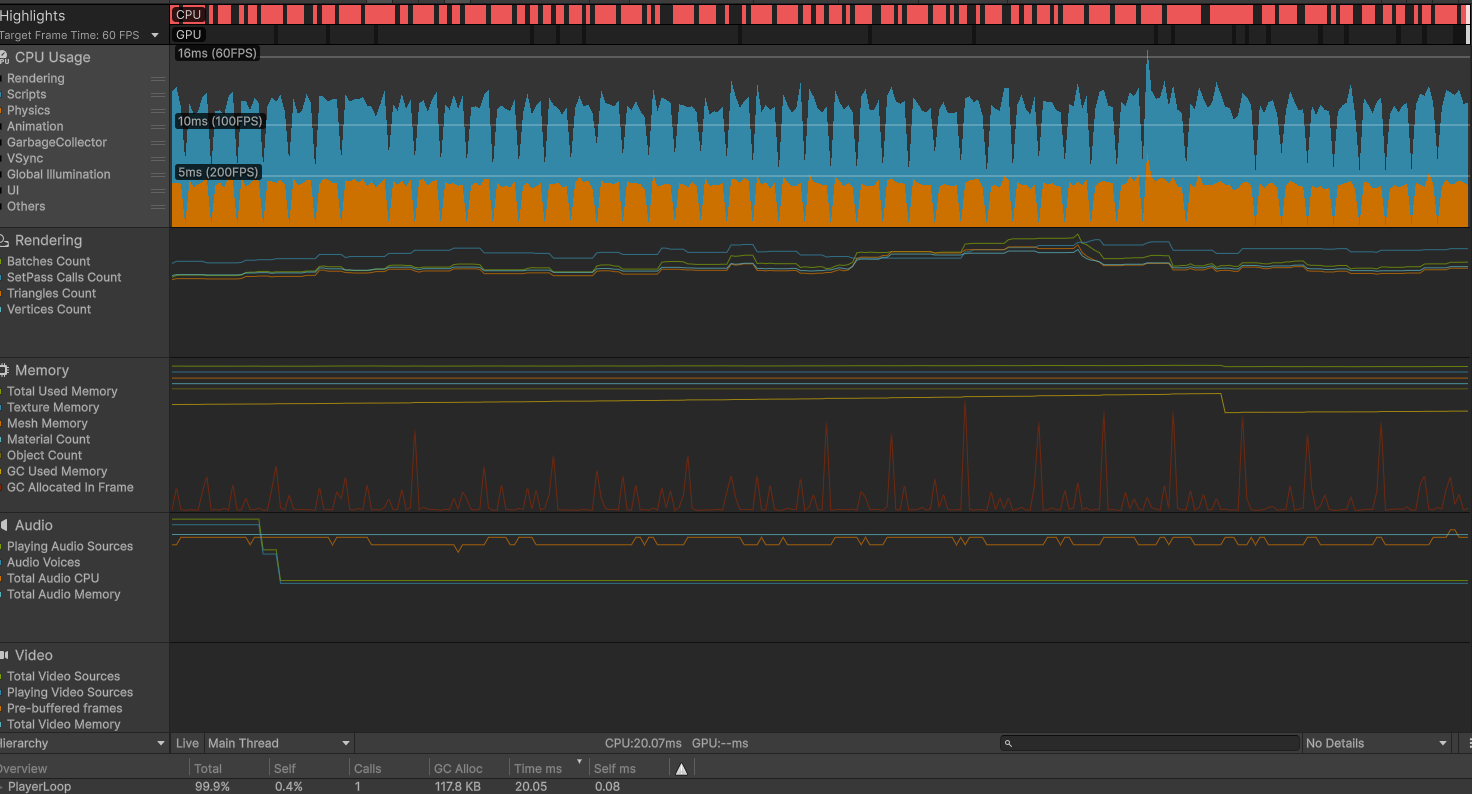
Smooth Runtime Scaling: During stress tests with 300+ characters, the game holds a steady 60 FPS on an octa-core AMD Ryzen 7 5700x. CPU usage never exceeds 25%, typically hovering around 15–24%.
Responsiveness on Re-Activation: Once characters return to an active range, they smoothly resume behavior without delay. This was achieved by deferring the transition to Far LOD until idle animations are complete, preventing abrupt frozen states.
I’m proud of how scalable and responsive the system has become. It took a lot of iteration to get right — but the payoff is massive. This level of control means I can confidently support large crowds, real-time battles, and dense environments without sacrificing responsiveness or framerate.
The Problem: Scaling Real-Time Combat
In my game, I simulate hundreds of characters in real-time, all with AI, combat logic, physics, and pathfinding. This works fine at a small scale — but once the character count climbs past 100, Unity’s main thread starts getting hammered. Every character trying to update every frame quickly becomes a bottleneck.
My goal? Hit 60 FPS even with 300+ characters active — without DOTS, just smart system design.
To solve this, I built a modular, runtime LOD system that:
- Dynamically switches character behavior based on distance and relevance
- Caps per-frame update work using a global update budget
- Smoothly fades characters in and out of logic/animation based on priority
Here’s how it works:
| Tier | Distance | Behavior |
|---|---|---|
| Close | Close to player | Full updates (AI, combat, animations) |
| Mid | Semi-distant | Throttled updates (AI every N frames, simplified logic) |
| Far | Offscreen/far | Fully culled (AI, animation, interactivity disabled) |
Adaptive Update Budgeting
Rather than updating all characters each frame, I implemented a frame-based update cap using a rotating queue of characters:
Each frame has a limited “update budget” for how many characters can process logic.
Characters are prioritized based on proximity, combat status, and freshness (when they were last updated).
This keeps update costs spread across frames, avoiding spikes.
Hysteresis & Transition Cooldowns
To avoid rapid toggling between tiers (especially around distance thresholds), I added:
Hysteresis margins: LOD transitions require characters to stay in/out of range for several frames.
Cooldown timers: Once switched, a character can’t change tiers again immediately.
This keeps the system smooth and avoids visible popping or logic flickering.
Far Mode & Reactivation
Characters in Far mode are:
Fully disabled (no AI, no combat, no animation)
Deferred into Far Mode only after graceful idle state exits
Re-activated seamlessly when needed again
This alone cut CPU usage drastically in scenes with 300+ characters.
The Results
Stress testing on an AMD Ryzen 7 5700X (8-core):
300+ characters active
CPU usage stays around 15–24%
Game runs at a rock-solid 60 FPS, even in intense real-time combat
Unity Profiler Snapshot — Before LOD settles
Unity Profiler Snapshot — After LOD optimization kicks in
Here’s a quick video showing the system in action during a heavy combat scene:
Final Thoughts
This took weeks of iteration and profiling — but the payoff is massive. The system is now fully modular, scalable, and resilient, even under heavy gameplay stress.
LOD isn’t just about visuals — it’s about smart CPU management. And with this system, I’ve got full control over how characters scale with gameplay needs.
Next steps? Hooking it into my quest/event systems and runtime population management for even more control.
Let me know what you think — and stay tuned for my next post where I’ll showcase my automated VRM character baking pipeline!
Feedback?
You’re always welcome to share thoughts or ask for technical breakdowns in future posts. I’m all ears!